
For C-suite executives and project directors, overseeing a massive portfolio of construction projects is a daily battle against information lag. You do not have the time to decipher ten different reporting formats from ten different project managers, nor can you afford to wait weeks for static spreadsheets to be consolidated.
To lead effectively, you need an executive command center.
At Vitalis Analytics, we build that command center by transforming disconnected data into high-level, automated visibility. Here is how upgrading to construction progress reports in PowerBI empowers executives to stop chasing updates and start driving results.
1. Standardizing the Executive View Across All Projects
While every build has its unique challenges, there is no reason your reporting should be entirely different from site to site. We believe that up to 80% of trackers and logs maintained across multiple projects can be standardized within your organization.
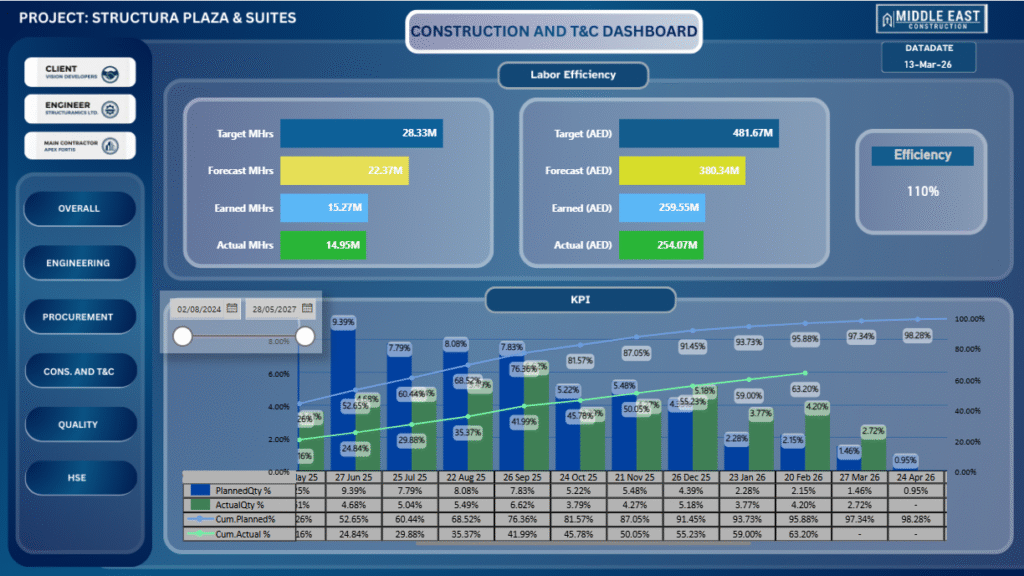
By unifying these metrics, we create a highly standardized construction project management dashboard. This means that when top management logs in, they see familiar, consistent, and high-level construction reports across the entire portfolio. All the vital information is exactly where you expect it to be, drastically reducing the time it takes to assess project health.
2. From Fragmented Teams to a Single Source of Truth
On any given project, different departments maintain their own trackers, logs, and spreadsheets. When management needs to make a critical decision, compiling this fragmented data is a nightmare.
Our PowerBI construction architecture brings all of these teams together into one centralized location. But we don’t just stop at spreadsheets. We connect your dashboard directly to your heavy-duty operational tools, pulling data from Primavera, MS Project, inventory and stores management tools, and other ERP systems. Connecting all these data points yields highly accurate, deeply useful insights that are impossible to see when departments operate in silos.
3. Automated Syncing: Real-Time Reporting, Zero Effort
Executive visibility means looking at the present, not the past. With our automated architecture, data syncs continuously from your various sources. As site teams or planners update their respective software, your construction progress reports in PowerBI refresh automatically. This eliminates the frantic end-of-month reporting rush and ensures the C-suite is always operating on the most current data available.
4. Proactive Delivery via Automated Emails
You shouldn’t have to go hunting for your data; your data should come to you. Our automated systems can be configured to send scheduled, customized emails directly to required stakeholders. Whether you need a high-level portfolio summary in your inbox every Monday morning or an instant alert when a critical variance threshold is breached, the system works for you behind the scenes.
5. Interactive Drill-Downs: Macro Visibility to Micro Precision
A great construction dashboard gives you the big picture instantly, but it also lets you investigate the details when needed. Because our reports are highly interactive with cross-filtering visuals, executives can easily spot a macro-level issue—like a budget overrun in one specific phase—and immediately drill down to the exact data point to identify the root cause without having to call a project manager.
6. Cloud-Based Command: Your Portfolio in Your Pocket
Modern executives are rarely tied to a desk. Because your data is securely hosted in the PowerBI cloud web service, your command center travels with you. Whether you are reviewing high-level financials on a PC in the boardroom, checking cross-filtered visuals on a tablet at the airport, or pulling up a quick variance report on your mobile phone, you have 24/7, frictionless access to your entire portfolio.
Take Command of Your Construction Data
At Vitalis Analytics, we build systems that give executives their time back. By standardizing your reports and automating your data flow, we turn raw metrics into strategic advantage.
Ready to build your C-suite command center?